Set the zones. Read them your way.
Every placement number in a report — deep balls, middle balls, forehands hit from the forehand side, serves to the T — is read against lines drawn on the court. Those lines are the player’s, not the court’s: a junior’s deep ball is not an adult’s, a left-hander’s forehand side is the other side, and a coach who thinks in feet should not have to think in percentages. Set them once per player and read them in the units you use on court.
- 1
Four zones, and what each one is for
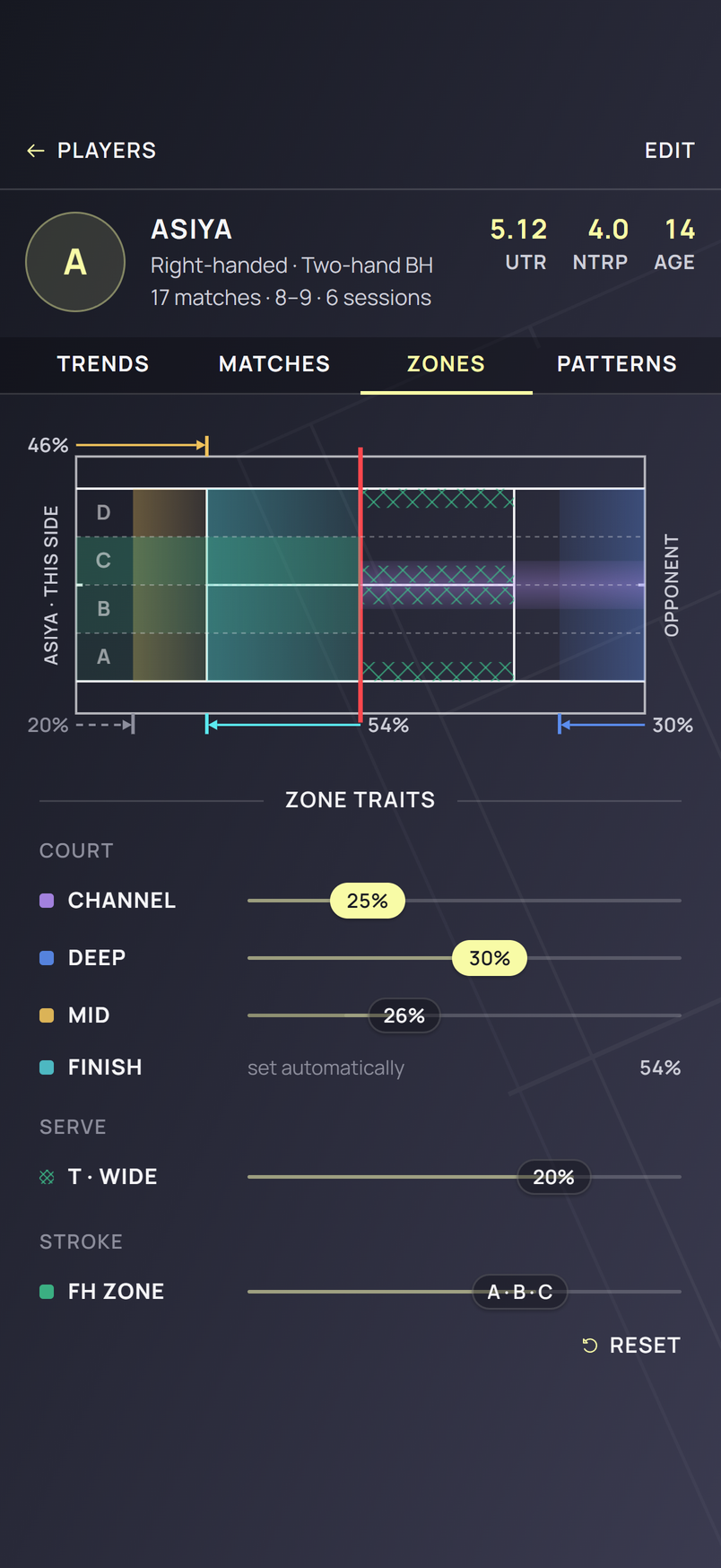
Channel is the band down the centre of the court, baseline to baseline: a ball inside it is a middle ball, a ball outside it went crosscourt or down the line — the angles that make an opponent run. Half the court’s width by default. Deep is the band at the far baseline a player’s balls should reach — the last 20% by default, and never past the service line. Mid is the band on the player’s own side they build points from, and Finish — set automatically as what is left between Mid and the net, the service box by default — is where they close points from. Coaches know these three as the deep, mid-court and attack zones. FH zone is how much of the court, measured from the forehand sideline, the player should take with a forehand. T · wide is the width of the two strips at the edges of each service box a serve has to find to count as a serve on target. Every Placement row, the landing court, the serve court’s targets and pattern matching read through these lines, and a match keeps the lines it was played with.
- 2
Where to set them
On a player’s profile, open Zones: the court redraws as you move the sliders, and Reset returns them to the app’s defaults. The sliders are grouped as the zones are — Court (Channel · Deep · Mid, with Finish shown beneath), Serve (T · wide), Stroke (FH zone). The value sits in the slider’s thumb, and the tapes under the court show each line as a distance from the baseline. A match starts from each player’s saved values: New match → Zones shows both players on one court — each half its owner’s Mid and Finish and the other player’s Deep — and a drag there changes that match only.
- 3
Read them in %, feet or metres
Settings → Zones → Court zones picks the scale: % — of the court’s width for the channel and the forehand zone, of the half court for deep, of the service box for T · wide, in steps of 5 — or Length, in feet or metres depending on Settings → Units, in tenths. A changed value is highlighted in its thumb. The zone itself does not move when you change the scale, only how you read it: a channel of 25% is 6.8 feet or 2.1 metres of a 27-foot singles court, and a deep zone of “the last 20%” is the last 7.8 feet of the half.
- 4
O’Shannessy’s lanes
Craig O’Shannessy divides the court’s width into four equal lanes, A B C D. The letters belong to the court, not the player: A is always the wide lane on the deuce side and D the wide lane on the ad side. For a right-hander the forehand lives in lane A, and his rule of thumb is that the forehand should own A, B and C and the backhand only D — three lanes to one. A left-hander’s forehand lives in D, so the same rule reads D, C and B for the forehand and A for the backhand. Settings → Zones → FH zone → Lanes makes the forehand slider count lanes, one to four, from the player’s forehand side. Under Lanes the court letters the four lanes on the player’s half and shades the forehand zone lane by lane, light at the forehand sideline and darker toward the far edge, so the line where the backhand takes over is the strongest line on the court.
- 5
Read the court drawing
The fills say what each zone means. Deep is blue, strongest at the far baseline where the deepest ball lands. Mid is gold, from the player’s own deep line toward the net. Finish is cyan, fading to the net. The forehand zone darkens away from the forehand sideline, so its far edge — where the backhand takes over — is the strongest. The channel is purple, strongest on the centre line. The serve strips are cross-hatched, broken at the T and at the net so the two boxes never read as one. The same drawing appears on the profile, in match setup and under the report’s Placement court.
- 6
A match of its own
In New match → Zones the player track names the two players; the lit one’s sliders show. The values start as the player’s profile; a changed value is highlighted and Reset brings that player back to their profile. The match keeps a copy of what it was played under, so a later change to the profile never rewrites an old report. Use this when a player is trying something for one match — a wider forehand zone, a stricter deep line — without changing their standard.
- 7
Where the zones come from
The three depth bands are Giampaolo and Levey’s reading of the court (*Championship Tennis*, 2013): each half in three zones, with the landing zone as the cue for the next shot — build from deep, build or attack from mid-court, finish from the box. Rallymetrica keeps the bands and the reading but puts the two lines on sliders, because the thirds are a coaching convention rather than a law, and the position model in the coaching literature (the red · yellow · green court of the USTA and ITF curricula) moves them by player and by wing. The lanes are Craig O’Shannessy’s (Brain Game Tennis), letters fixed to the court. The court’s own measures — 23.77 m by 8.23 m, the service line 6.40 m from the net — are the ITF’s Rule 1 and set the length scale, the default mid line and the deep band’s cap. The full list, with what the app borrowed and where it departs, is under Sources on the Stats Engine page.
Good to know
- The defaults: channel 50%, deep the last 20%, the mid line on the service line (so Finish is the box), forehand zone 75% (A · B · C), T · wide 20% of the box.
- Ranges: channel 10–75%, deep the last 10–45% (never past the service line), the Mid band from 1 m up to where Finish would drop under half the box, forehand zone 25–100% — one lane to the whole court — and T · wide 5–25%.
- The scale is how the sliders read, not how the zones are stored: reports, the stats CSV and backups keep the shares, and a phone set to metres reads another phone’s backup exactly.
- Serve sessions draw the server’s T and wide strips from the same settings; a serve the server calls wide and the map calls middle is a conversation about the strip width, not the serve.
Keep exploring