Link your coach. Share the match live.
A linked coach can follow a player’s match on their own phone. Each saved point updates the shared match as it lands, giving both people the same score, report, and recorded rallies to review. Your matches live on your phone, and everything sent between the two phones is end-to-end encrypted.
- 1
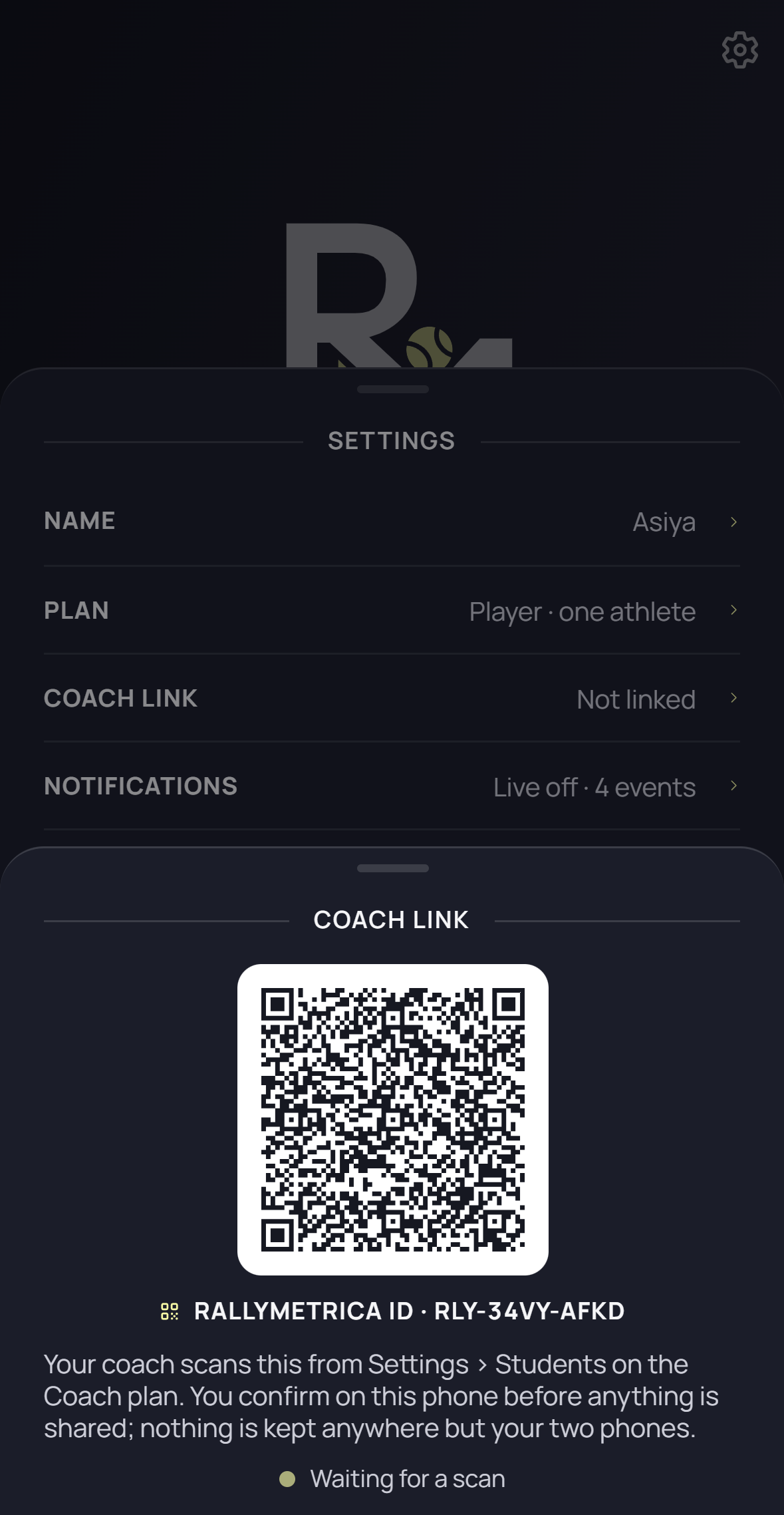
Show the player’s code
On the player’s phone, open the gear on Home, then Settings → Coach link. Display the QR code. This screen requires the Player plan.
- 2
Scan on the coach’s phone
On the Coach plan, open Settings → Students → Add student. Allow camera access and scan the code displayed on the player’s phone.
- 3
Approve the link
The player sees the coach’s name and Wants to link. Tap Link to approve. The coach then sees the player’s linked confirmation. The initial sync shares the profile, past matches, and any live match recorded so far.
- 4
Follow saved points
Record the match on the player’s phone. On the coach’s phone, find the shared live match in Home or Matches, then tap Report. Updates arrive after each saved point, including corrections made with Undo.
- 5
Review together
Use Replay so far to revisit the recorded match. In Settings → Students, open the student to use Open profile. Coach-created pattern assignments sync back to the player for their next match setup.
- 6
Unlink when you choose
On the player’s phone, open Settings → Coach link, tap Unlink, and confirm Unlink. New sharing stops on your phone. Once the coach’s app is online and receives the unlink, match copies received through the link are removed. Your original recordings remain on your phone.
Good to know
- Points arrive on the coach’s phone in the background, with a notification every set, game or point as the coach chooses under Settings → Notifications — per student under Settings → Students. Unfinished shot taps are not shared until the point is saved.
- Offline updates queue and sync in order when connectivity returns. Offline unlinking also waits for connectivity to notify the other phone.
- Shared matches are read-only on the coach’s phone; the recording phone controls the match.
- The delivery relay stores encrypted messages until retrieval, plus device and connection details. It cannot read the shared match content.
- Unlinking does not remove independently recorded coach matches or copies already exported or shared outside the link. Pausing stops new updates and keeps received copies.
- Detailed tracking supplies the placements needed for full rally replay and pattern execution results.
Keep exploring