Track, correct, and resume
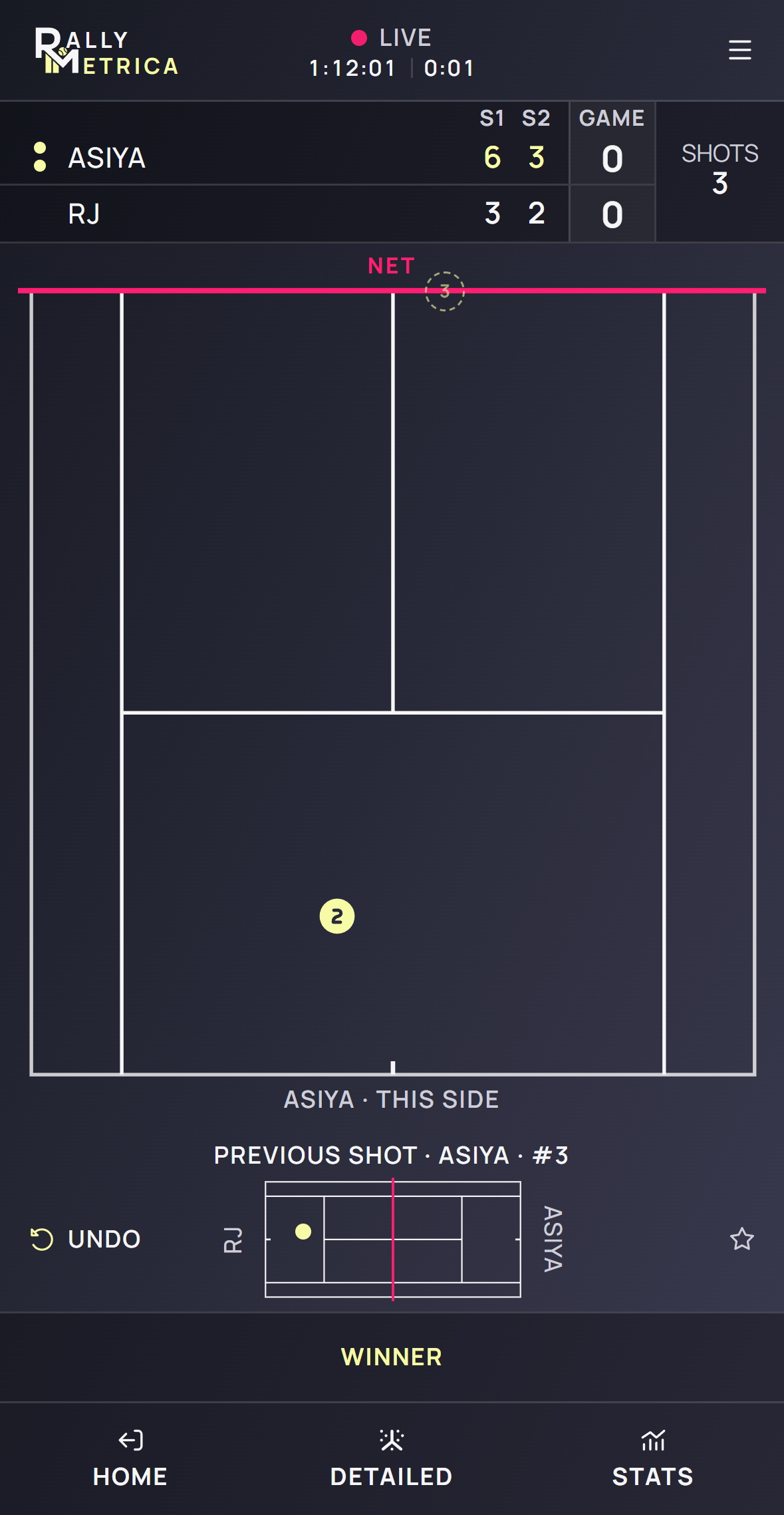
Follow the live court’s prompt one action at a time. The scoring updates as you record points, and you can correct a mistake or leave the match open.
- 1
Follow the court prompt
In Detailed, tap the serve landing, then each return or rally landing. In Counter only, tap once for the serve and each shot. In Score only, tap the point winner’s side.
- 2
Record how the point ended
In Counter or Detailed, choose the appropriate ending, such as Ace, Service winner, Winner, Unforced error, or Forced error. In Detailed, an error requires an outside landing or a net tap.
- 3
Confirm the point
Review the ending sheet, choose Forehand, Backhand, or Other when prompted, then tap Save point. Star and Add note are optional. Score only awards the point directly.
- 4
Correct or take a break
Use Undo to reverse a draft, unconfirmed placement, or earlier recorded action. Use the left footer control to return to the app. Your match remains live; tap Resume on its card to continue.
- 5
Finish the match
Open the match menu and select End match. If the score has not decided the result, select the winner and confirm End match.
Good to know
- Fault, Double fault, and Let appear during serving as appropriate.
- Leaving keeps the current score, open point, and time on court available to resume.
- Undo also works after you resume a match.
Keep exploring