Turn a report into a practice plan
A report earns its place only if it changes next week’s practice. This is the order to read it in, the one question each page answers, and the way to leave with a single number to improve.
- 1
Start with Momentum, not the score
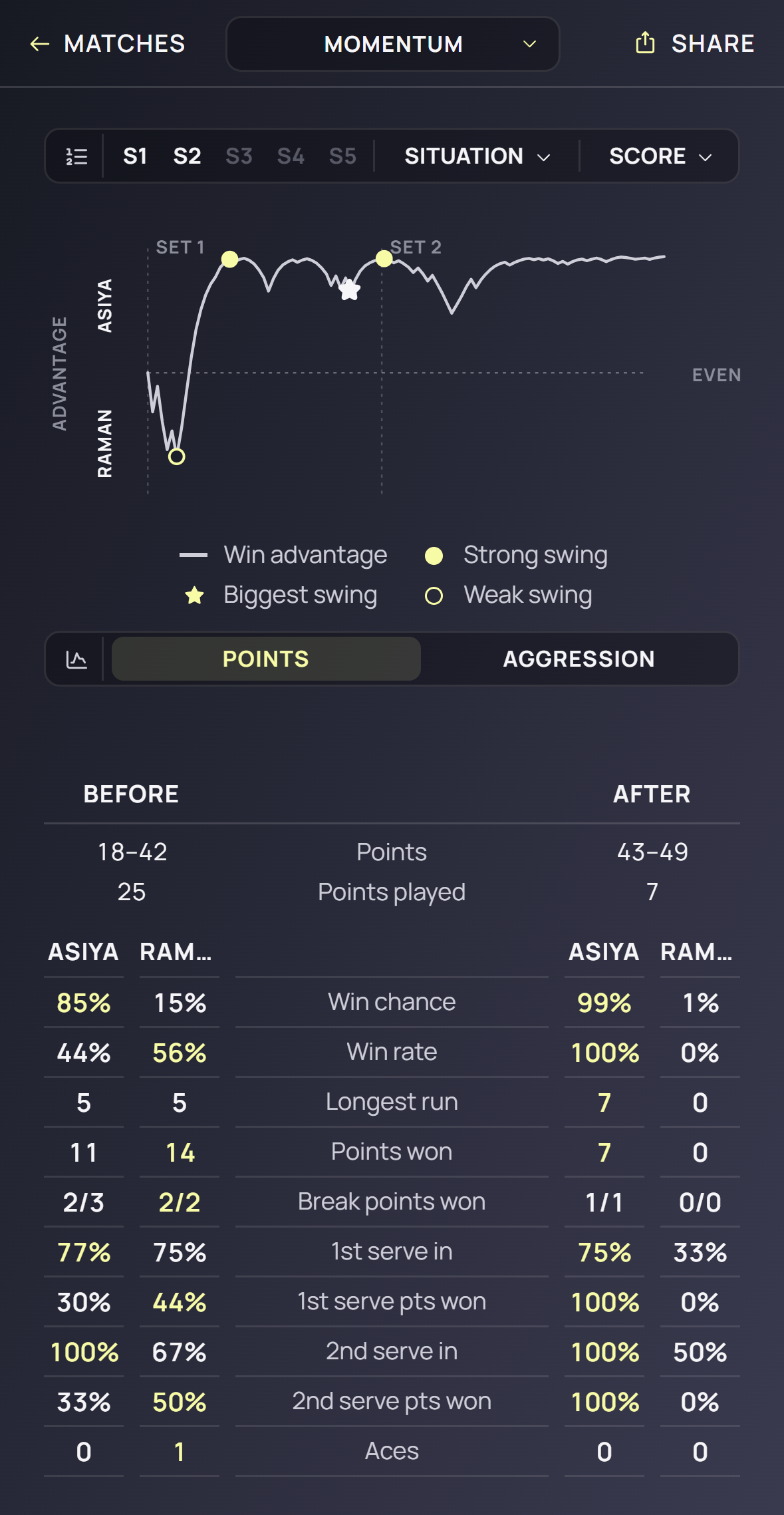
Open the report and go to Momentum → Points. Find the starred swing — the largest move the curve made — and tap it. The popover compares the stretch before with the stretch after: points played and win chance for each player. If the win chance fell while the share of points barely moved, the big points were lost, not the rallies: go to Pressure. If both fell together, a stretch of poor play: put the set cut on that set and go to Aggression.
- 2
Ask Aggression who was dictating
The Margin or Efficiency line sits above EVEN when a player is building more points than they give away. The counts beneath say how. If Yielding is the bigger column, the problem is errors — and the split tells you which: many invited forced errors mean short, middle balls that invited the attack (a depth problem); many unforced errors mean margins and shot selection. If both columns are small, the player made nothing happen and the opponent decided the match (a passivity problem). Switch Momentum to Aggression to see when in the match the dictating stopped.
- 3
Check Pressure for the moments
Points won overall at 52% with break points won at 20% is not a tennis problem; it is a pressure problem. Read 30–30, 40–40, break points saved, first points won. A gap of ten points or more between the pressure rows and the overall row points at the practice format, not the stroke: play practice games from 30–30, serve second serves only, start sets at 4–4.
- 4
Find the shot
Serve: 2nd serve points won low with double faults present is the second serve; 1st serve in high with 1st serve points won low means the serve goes in but goes nowhere — check T · Mid · Wide. Return: return in % low on first serves is position, not technique. Landings: a low deep % is depth; a direction share that is nearly all crosscourt is a pattern the opponent has read.
- 5
Pick one thing and write it as a number
One metric, one cut, one window: “2nd serve points won under break point — 31% now, 45% over the next five matches.” Not three things. The report will still be there next week.
- 6
Check it on Stats
Open Stats, choose that metric, put the same cut on, set the window to 7 and the view to Trend. It has moved when the slope is positive and the last three dots sit above the old average. One good match inside the old usual range is not evidence yet; it is a normal day.
- 7
Coaches: hand it back as a pattern
If the fix is a sequence — serve wide, forehand into the open court — draw it in Patterns, assign it, and have the player include it in their next Detailed match. The report’s Patterns page then returns attempts, completions and points won, which is the fix measured.
Good to know
- Momentum → Points needs only the score. Aggression needs a Counter match; the invited / pressured split needs the landings of a Detailed one.
- The aggression rows read a dash under ten decided points — a short match says nothing about aggression.
- Five matches is the smallest honest window for a change; do not chase one result.
- The reference page defines every row named here: Learn → The stats engine.
Keep exploring