Serve sessions: a basket at a target
A serve session is one server and a basket of balls, served in blocks against a target called on the court. Two numbers judge every block — did the serve go in, and did it go where it was aimed — and the report draws the session over time, so a good start that fell apart does not hide behind one percentage.
- 1
Set it up
On Sessions → Serve → + New serve, choose the Server and the Format: Pairs (a second serve follows a fault, so a block counts points, as a match would), 1st only or 2nd only (a block counts serves). Blocks (one to five) and Block size (5 · 10 · 20). No side and no target here — both are called on the court, block by block. Tracking is always Detailed.
- 2
Call the side and the target
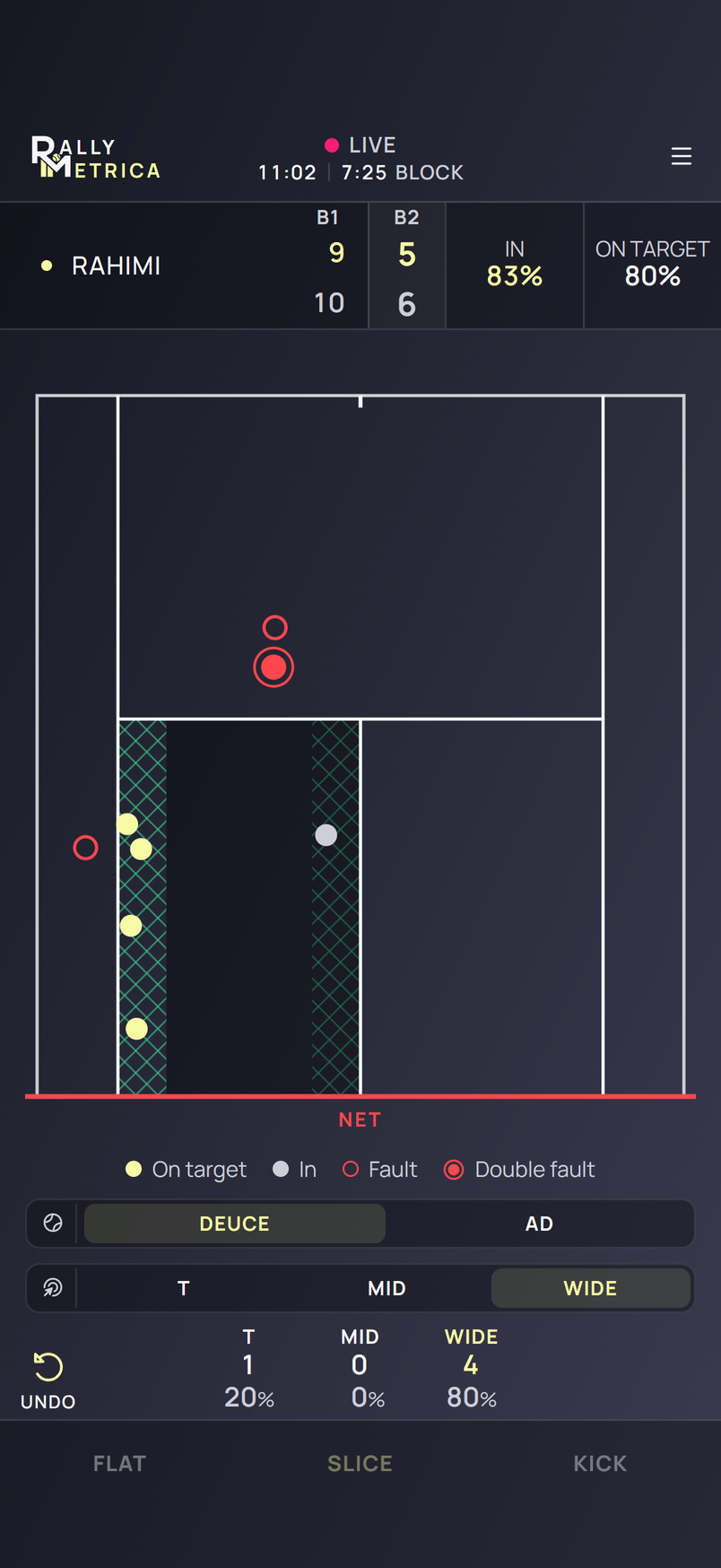
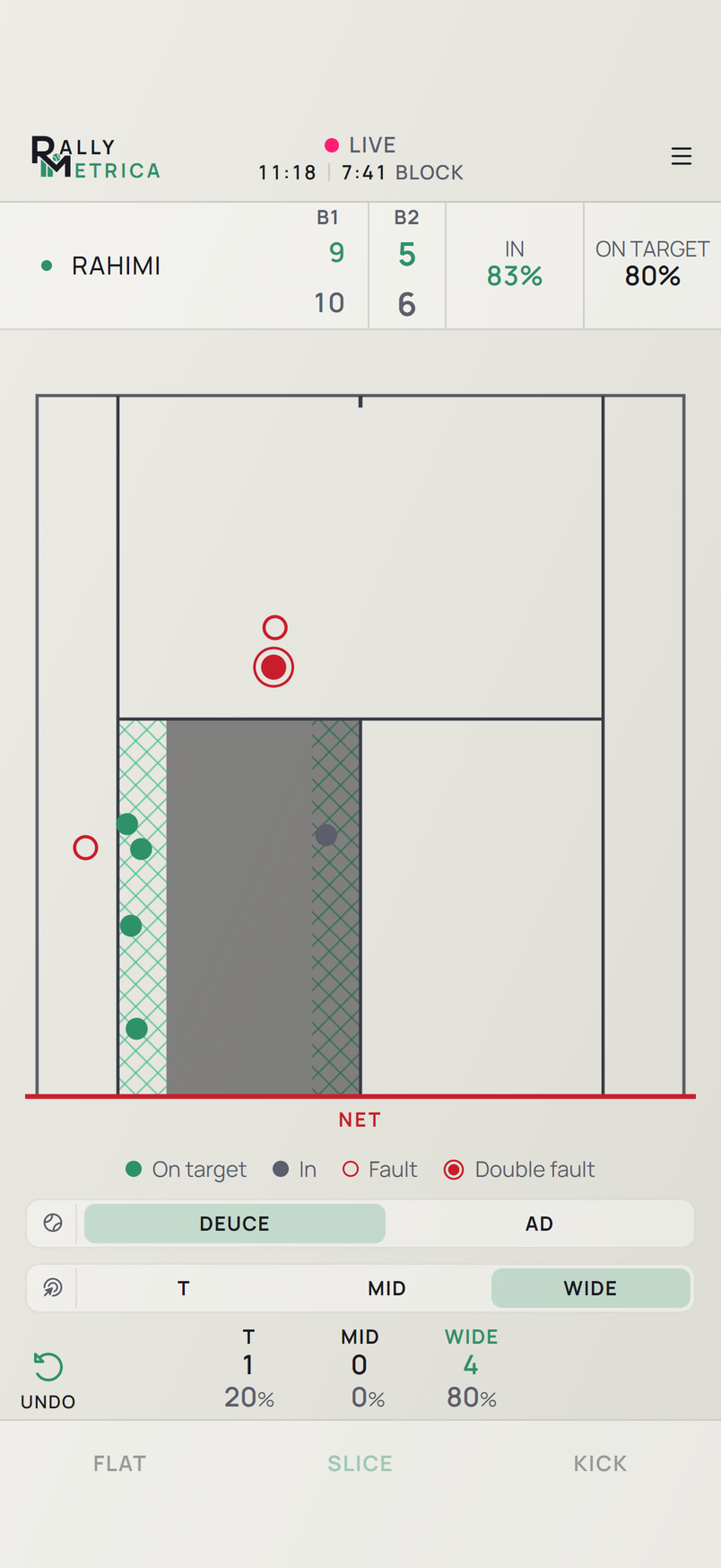
The court is the live court’s half with the service boxes lit, drawn from where you stand: by default from behind the server — the net at the bottom, the deuce box on the left. Standing behind the receiver, switch it from the menu: ☰ → Standing behind → Receiver turns the court round — the net at the top, the deuce box on the right — so left is still your left. Every serve is stored in the server’s frame whichever way you look, so the report reads the same from either end. Under the court two strips: Deuce · Ad for the side, and T · Mid · Wide for the block’s target. A block always has one target — it is the aim the next serve is judged against, not a filter. The T and Wide zones are the server’s own strip widths from their profile’s Zones (a fifth of the box by default); both strips are hatched, with the block’s target lit. The middle is the plain box between them. Change the side or the target between blocks; within a block it stands. With a target called, the rest of the box dims and the target stands out — a serve that lands outside it is still in, only off target.
- 3
Serve, tap, type
One serve is one tap where it landed: inside the box is in, and the strip it fell in — T, middle or wide — is its zone; outside the box, or on the net, is a fault. On Pairs a fault brings the second serve — 2nd serve lights until it is hit, and a missed second serve is a double fault. Optionally tap the type after the landing: Flat · Slice · Kick; a fault carries the type it was meant to be. Undo removes the last serve. The running cells read In % and On target %; the block closes by itself on its count and shows its summary — Block 1 · Deuce · Wide target, so many of ten in, on target, the longest streak, 1st and 2nd, T · Mid · Wide — with Next block or, after the last block, End session. If the app is closed between a block’s first picks and its first serve, the picks are kept.
- 4
Read the cover
The blocks as cells across the top — In over the block’s unit (points in Pairs, serves otherwise), the best block lit — then In % and On target % for the session, and Format · blocks. The two numbers answer different questions. In % is whether the serve was good. On target % is read *of the serves that went in*: 60% in and 50% on target means half the good serves found the strip you called. A high in % with a low on-target % is a serve that goes in but will not go where it is sent — a placement problem; the reverse is a serve that knows where it is going and misses too often — a margin problem. Tell the player which one they have; the practice is different.
- 5
Read the SERVE page
The table lists the catalogue: on Pairs Points with a serve in first (the share of points that ended with a good serve — what a match would count), then Serves in, 1st and 2nd serve in, Double faults (Pairs and 2nd only), the Longest streak; then the target rows — On target and the shares To the T · To the middle · Out wide — and the types Flat · Slice · Kick. The filter track is the session’s own: block, 1st · 2nd (Pairs only), Deuce · Ad (when both sides were served) and the type (when any serve was typed). Under a filter the target rows show the filtered serves against the whole session, lit when they beat it: Deuce against the session says which side the serve is weaker from; Kick against the session says whether the kick is the serve that finds the strip. A row the filter would empty or merely repeat is greyed — the first-serve rows under 2nd, the type shares under a type.
- 6
Read TREND
TREND draws the session on one axis after every serve: the running in share, the running on-target share and the streak so far (consecutive serves in, reset by a fault). The switch beneath the chart picks the reading. On STREAKS, the streak is the repeatability the percentage hides: 70% in with a longest streak of 3 is a serve that goes in but not twice running; 60% in with a streak of 9 is a serve that was grooved for a stretch and then lost. The mean and the median streak sit as lines, read as a co-op’s runs: the median is the typical streak, the mean is lifted by the long ones, and the gap between them is how much of the session was one good patch. On TARGET, the curve’s direction is the finding: climbing, a serve settling into the strip as the basket goes on; falling, fatigue, or a target the server does not have yet. The streak reads under the block filter alone; a 1st · 2nd, side or type filter skips serves, so the row reads a dash.
- 7
Read PLACEMENT and the Timeline
Placement is the serve court per side with every landing: on target filled in the accent colour (yellow in dark mode, green in light), in but off target filled grey, a fault a hollow red ring. The three zone counts under it, the target zone’s count lit. Because the strips are the server’s own widths, a serve the server calls wide and the map calls middle is a conversation about the strip width, not the serve. Timeline lists every serve — Block 2 · serve 14 · wide · in · kick — in order.
Good to know
- Compare like with like: a block of ten pairs and a block of ten first serves do not share a denominator; the cells say which unit a block counts.
- A session with one block shows its cell faint. A session ended early shows every block of its setting with the unplayed ones faint; a session with one side served has no Deuce · Ad track; an untyped session has no type track and no type table.
- Sessions are not charted on the Stats tab; TREND is a serve session’s trend, and the longest streak and On target % are the two numbers to compare across sessions.
- Serve sessions carry no patterns; a pattern that starts with a serve is drilled in a VS rally with a serve start.
- A linked coach receives a serve session live, with a notification at its start and end.
Keep exploring